Installing n8n on a Hostinger VPS: a practical guide
Install n8n on a Hostinger VPS, compare the hosting options and set up access, backups and updates for your automations.

Want to automate a task while keeping control over where n8n is hosted? A Hostinger VPS can run your instance, but installing it is only the start. You also need to protect access, keep your data and be able to restart the service after an incident.
This guide covers self-hosted n8n on a Hostinger VPS. It does not describe Hostinger’s separate Managed n8n offer. The screenshots come from the 2025 tutorial; the steps and limits were reviewed on 15 September 2026. Menus can vary depending on the journey and the plan you choose.
Hostinger links marked as partner links may earn Scale Me a commission if you sign up through them. The terms and price that apply are the ones shown when you place your order.
1) Choose between your own computer, n8n Cloud and a VPS
Before you order a server, decide who is responsible for keeping it running. n8n distinguishes hosting managed by its own team from self-hosting, where you look after the infrastructure. Compare the ways to use n8n.
| Option | Main benefit | Limit to plan for |
|---|---|---|
| Your own computer | Learn and test with little commitment | The machine and the service must stay available for scheduled tasks |
| n8n Cloud | Use n8n without running the server | Features and limits depend on the plan |
| Self-hosted VPS | Choose the environment and control its configuration | Maintenance, backups, security and capacity are yours to manage |
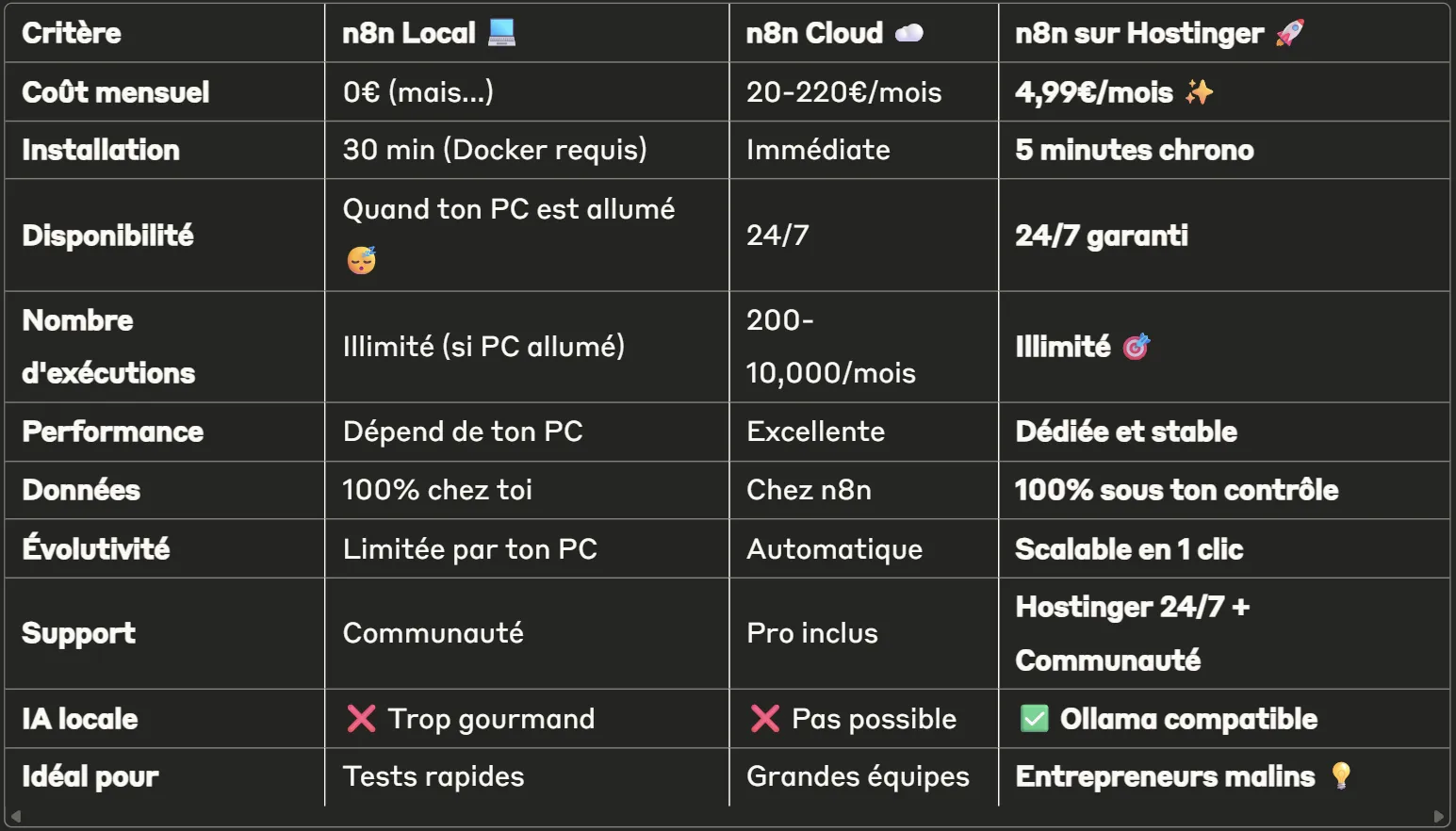
The table below is an archive of the first version of this guide. Its prices, timings, availability promises and “unlimited” claims are not current terms. The text table above and the explanations in this guide replace it when choosing your hosting.
Your own computer can be enough to learn
If you stop n8n, switch the PC off or let it go to sleep, the automations it hosts do not keep running normally. That does not make a local install useless: it is a good environment for preparing a workflow with test data.
To receive external events, you also need an address that can be reached and is properly protected. Avoid exposing your computer to the public just to get around choosing suitable hosting.
With Cloud, you also pay for the service to be managed
Compare n8n Cloud based on the time you want to spend on administration, the features you need and the limits of the plan. The price does not cover exactly the same service as renting a server. Check the official n8n pricing and limits when you make your decision.
A VPS has finite resources
The absence of a commercial execution counter on an edition does not mean the server can absorb anything. A workflow that processes a large file, several simultaneous executions or a slow API can tie up a lot of memory and time.
So the number of workflows is not enough to size the VPS. Note instead how often they run, the volume of data, the average duration and the number of simultaneous executions. Add paid APIs, backups and maintenance time to your budget.
If you prefer a managed option at Hostinger, check its scope separately: their Managed n8n documentation describes an interface and operations that differ from the VPS covered here.
2) Prepare the VPS and choose a plan
You can browse the plans through this Hostinger partner link. Before you order, look at the total amount paid, the commitment period, taxes, the renewal price and the options included.
The next screenshot shows the old KVM plans. It helps you spot the criteria to compare; its amounts are not a current price list.
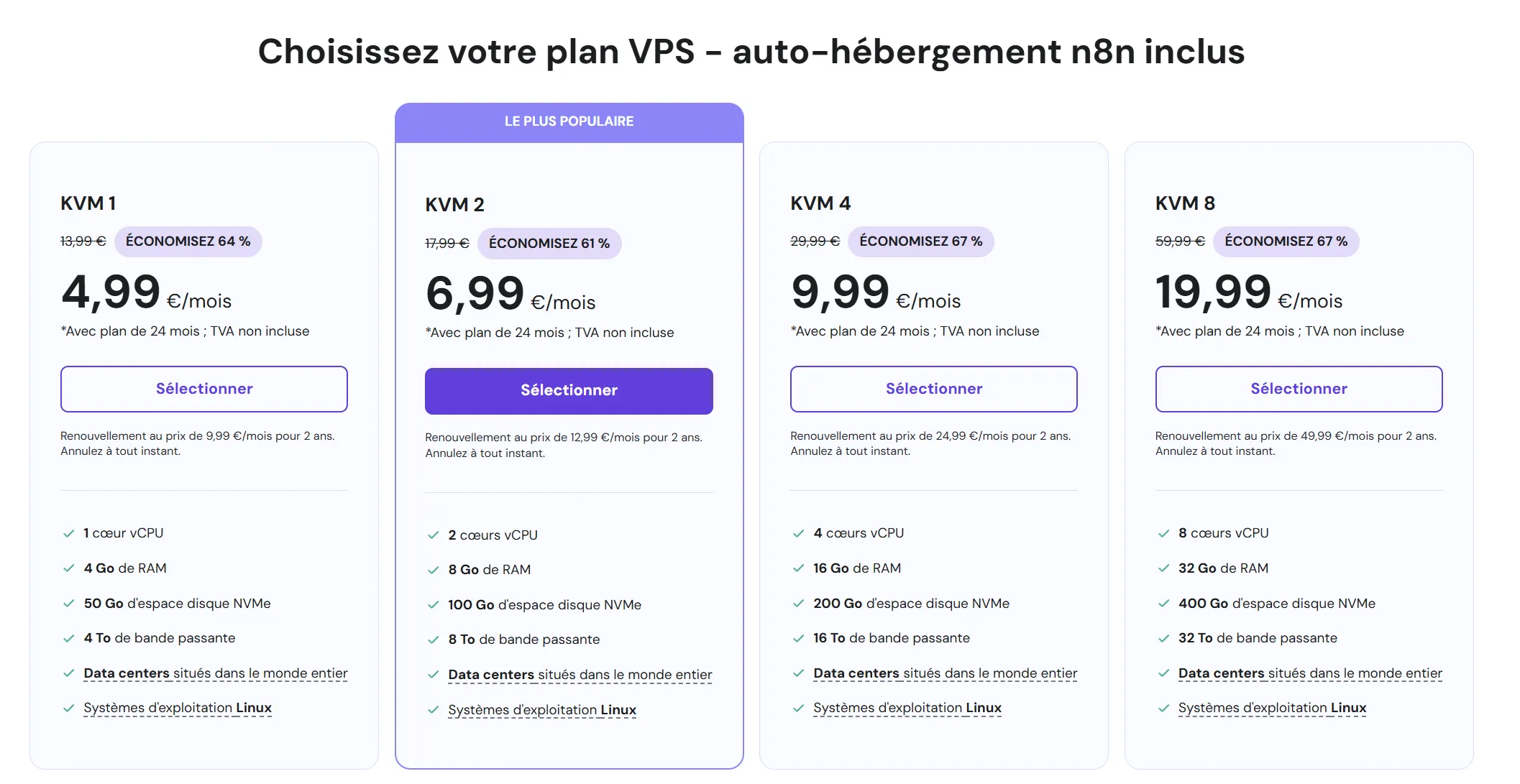
The criteria to compare
- Memory and processor: keep headroom for peaks in activity, not just for having the editor open.
- Storage: allow for the database, the execution history and the files being processed.
- Backups: check how often they run, how long they are kept and whether you can download them.
- Server location: take into account your users and the connected services, as well as the requirements attached to your data.
- Scaling up: find out how to add capacity and whether it involves any downtime.
I don’t recommend a plan on the sole promise that it can run “100 workflows”. Start with a representative load, monitor it and adjust the capacity to what you observe.
Prepare access and the first test
Make sure you have an email address you control, a password manager, the domain or access address you plan to use, and a test automation with no commercial consequences. Also decide who can step in if the server goes down.
To get started, use a new VPS dedicated to this installation. On an existing server, changing the operating system can erase the data: it is not an ordinary n8n update.
3) Install Hostinger’s n8n template
The template offered by Hostinger sets up n8n and its dependencies. The installation can be quick, but I no longer give a fixed time: provisioning, setting up access and running checks take a variable amount of time.
In the creation journey, select the n8n application when it is offered. The historical screenshot shows a search for “n8n” among the application templates.
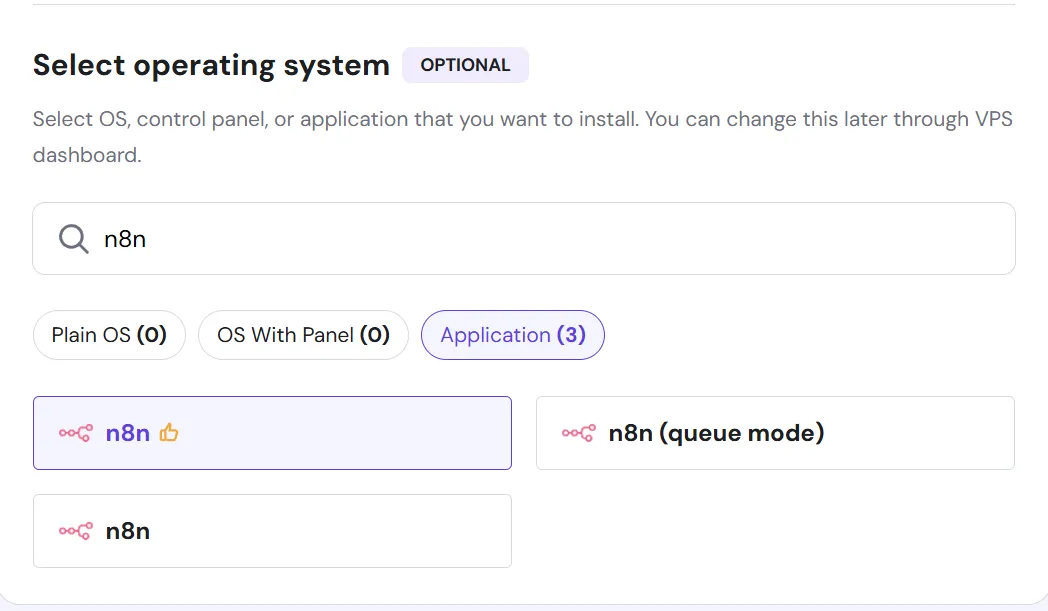
For a simple first deployment, choose the standard template. Queue mode meets additional load and architecture needs; it is not an option to switch on just because its name sounds more powerful.
In hPanel, the documented path to apply a template is VPS > Manage > OS & Panel > Operating System, then a search for n8n. The Change OS action reinstalls the server and wipes its content. Only use it on the new VPS you set aside, or after preparing a migration and a backup you can restore. Hostinger’s official VPS template procedure.
Create a long, unique server password, store it in your password manager and let provisioning finish. Administrator access to the server gives broad powers over the instance and its data: don’t share it just to give someone access to a workflow.
4) Open n8n and set up the owner account
From the VPS overview, use the button for managing the application. If your deployment appears in Docker Manager, open the n8n project and then its access address.

Check that you are opening your instance’s address over HTTPS. Create the owner account with an email address you control and a password different from the server one. Turn on two-factor authentication in the available settings and keep your recovery methods safe.
Then check the time zone before you create scheduled tasks. A scenario planned for 9am but run in another time zone can produce the right result at the wrong time.
The free Community key does not unlock every feature
Without a paid licence, the installation uses the Community edition. Free registration by email can unlock extra features: folders, debugging tools in the editor and custom execution data. It does not turn the instance into an Enterprise plan and does not automatically give you priority support. Official comparison of the n8n editions.
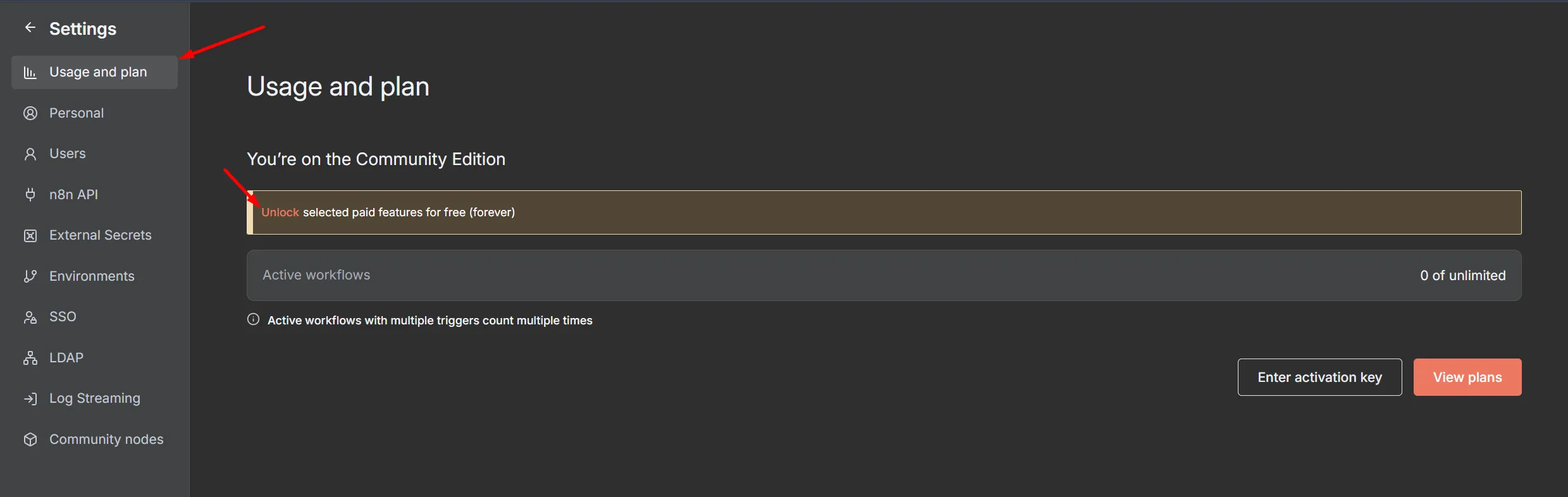
To register an existing instance, open Settings > Usage and plan, use the unlock option and request the key at your email address. Activate it through the message you receive or the activation field provided. The exact list of features depends on the edition and may change.
n8n is not software without conditions of use. Its code is available under licences that govern, among other things, commercial use and redistribution. To sell access to an instance or build its interface into your own product, check the project’s official licence and the terms that apply to your case.
5) Plan backups and updates
A workflow export is not a full backup
A workflow file describes the automation. It does not replace a backup of the database, the saved credentials, the configuration and the files the instance needs.
Plan a consistent backup of the database and the persistent volumes. Also keep the encryption key used for credentials, with protected access, separate from any public code. Without the right key, a restore of the encrypted data may be unusable. n8n encryption key.
Hostinger’s migration procedure explains the differences between copying a volume and backing up a separate PostgreSQL database. It needs adapting to the storage your installation actually uses.
Choose the frequency according to how much work you could afford to lose. Keep a recoverable copy outside the server and test a restore on a separate environment. A backup that has never been restored does not prove you will be able to get back up and running.
Update with a way to roll back
Before an update, read the release notes, back up the instance and check the important workflows on a test environment if your business depends on them. Plan for any downtime.
Hostinger documents updating through Docker Manager or through the matching Docker deployment. Follow the procedure for your installation, without copying a folder path that does not match your server. Updating n8n at Hostinger.
After the update, check that the editor opens, that access to services works, and that scheduled triggers and events received from outside still fire. A login page that opens is not enough to validate your automations.
6) Test a first workflow before activating it
Start with a simple scenario and dummy data: a manual execution that transforms a piece of information then writes to a test destination. Check the input, the output and the history.
Then add the planned trigger and check that:
- The scenario starts at the right time or actually receives the expected event.
- An error is visible and triggers a useful alert.
- A retry does not create the same order, invoice or request twice.
- Sensitive data is not kept unnecessarily in the execution history.
- The service restarts correctly after a controlled reboot.
For a webhook, use the production URL once the workflow is ready and published, depending on your version. A test URL may only work while you are manually listening for a test event. Also check the protections expected by the sending service.
Monitor memory, processor, disk space and errors over a representative period. If the load increases, first look for what is consuming resources: large files, loops, history kept too long or simultaneous executions. Changing plan without a diagnosis may only push the problem back.
If you want to start from an example, browse the n8n workflow templates and the n8n community. Review the actions and the access requested before you activate a template on your real data.
Would you rather start from the business problem and hand over the setup? Tell me about your automation needs and we will scope what needs to be built and maintained.

FAQ
How many workflows can a VPS run?
There is no number that holds for every case. Frequency, the data processed, duration and simultaneous executions matter more than the number of saved workflows. Measure a representative load before sizing.
Is self-hosted n8n free and unlimited?
The Community edition is free within the terms of its licence. The server, APIs and maintenance can cost money, and hardware resources remain limited. Some features require a paid licence.
Can I migrate from Make or Zapier?
You can recreate your automations in n8n, but don’t assume an identical automatic conversion. Compare triggers, fields, errors and duplicates with test data, then switch over gradually.
Can I host an AI model on the same VPS?
It depends on the model and the resources it needs. Compatibility with a tool like Ollama guarantees neither a fast response nor enough memory. A demanding model can slow n8n down; consider a separate server or an API depending on your needs.
Does Hostinger support manage my workflows?
Don’t assume so. Check the services included in your VPS plan. Hosting support, managing an application and fixing your business logic are separate services.
Can I install other applications on the server?
Yes, if the capacity and configuration allow it. Plan for port conflicts, storage and recovery after an incident. For an important automation, isolating services can make maintenance easier.

Pierre Bour
Founder of Scale Me. I help businesses with Google Ads, and I build automations and custom tools that take the repetitive tasks off their plate.
Want to automate without losing sleep over it?
I design your automations and custom tools, then put them into production. You stay in control, I handle the technical side.