GA4 key events: avoid double counting in Google Ads
GA4 quietly renamed conversions to key events. Here's how to set them up without counting twice what Google Ads already counts.


Key takeaways
- What's changing: your GA4 conversion events are now called key events, and Google Ads can import some of them as conversions.
- Who it concerns: any account that tracks its sales or leads in GA4 and has linked that property to Google Ads.
- To do this week: open the list of key events in GA4 and compare it with the list of conversion actions in Google Ads.
If you run your Google Ads campaigns on conversions coming from GA4, the name has changed without any warning. What used to be called a conversion in the Analytics reports is now a key event, and this switch isn’t just a matter of vocabulary: it has a direct bearing on how you choose what counts for your advertising budget.
What exactly is changing
A key event measures an action that is particularly important to the business: a purchase, a form submission, a call. Any event GA4 already collects can be marked as one, with no extra code in most cases.
The change of vocabulary doesn’t change anything about the data already collected. What changes is where you tick the box: in GA4, an event becomes a key event from the events screen, no longer from an old menu called Conversions.
Once marked, a key event can be imported into Google Ads as a conversion action, with its own attribution and value settings. It’s this import step that deserves a check, not the change of name itself.
A useful detail so you don’t get lost in the reports: a Google Ads conversion created from a GA4 key event doesn’t appear a second time in the standard Analytics reports. It stays visible on the Google Ads side to drive bidding, but GA4 doesn’t show it twice on its own side. The separation already exists at that precise point, which doesn’t spare you from checking the other direction: the one where Google Ads counts the same sale twice on its own side.
Who it concerns, and who it doesn’t
It concerns you if at least one of these situations describes your account:
- your GA4 property is linked to a Google Ads account;
- you run automated bidding on conversions imported from GA4;
- a connector or an agency set up this link for you, a long time ago.
It doesn’t concern you if Google Ads tracks your conversions only through its own tag, with no active GA4 link. In that case, the renaming changes nothing in your setup.
The most common case is still the account set up several years ago by an agency or a developer who has since moved on. Nobody knows exactly what was linked any more, or why, and the link keeps working silently, without anyone checking it again.

What it changes for your advertising budget
The risk isn’t the change of name, it’s the duplicate. Many accounts already track a sale with the Google Ads conversion tag placed on the confirmation page, and also import the matching key event from GA4. The result: a single sale counts twice in the conversion reports.
An automated bidding algorithm that receives an inflated signal doesn’t get smarter, it gets misinformed. It adjusts bids on a volume of conversions that never existed, and the budget follows a false trail without any alert flagging it.
Smart Bidding adjusts its bids based on the number and value of the conversions it receives. A duplicate doesn’t make you sell twice as much, it only makes the algorithm believe it’s getting twice as many sales, which pushes the budget towards profiles that resemble a volume that never existed.
This is a check you do once, not an overcomplicated system to maintain. If you’d like to make this kind of assessment without the pressure of an emergency, on your real account rather than on a market average, get in touch.
Not sure whether your Google Ads conversions count a sale once or twice? It's the kind of thing I check first on an account I take over.
The checklist for setting up your key events without duplicates
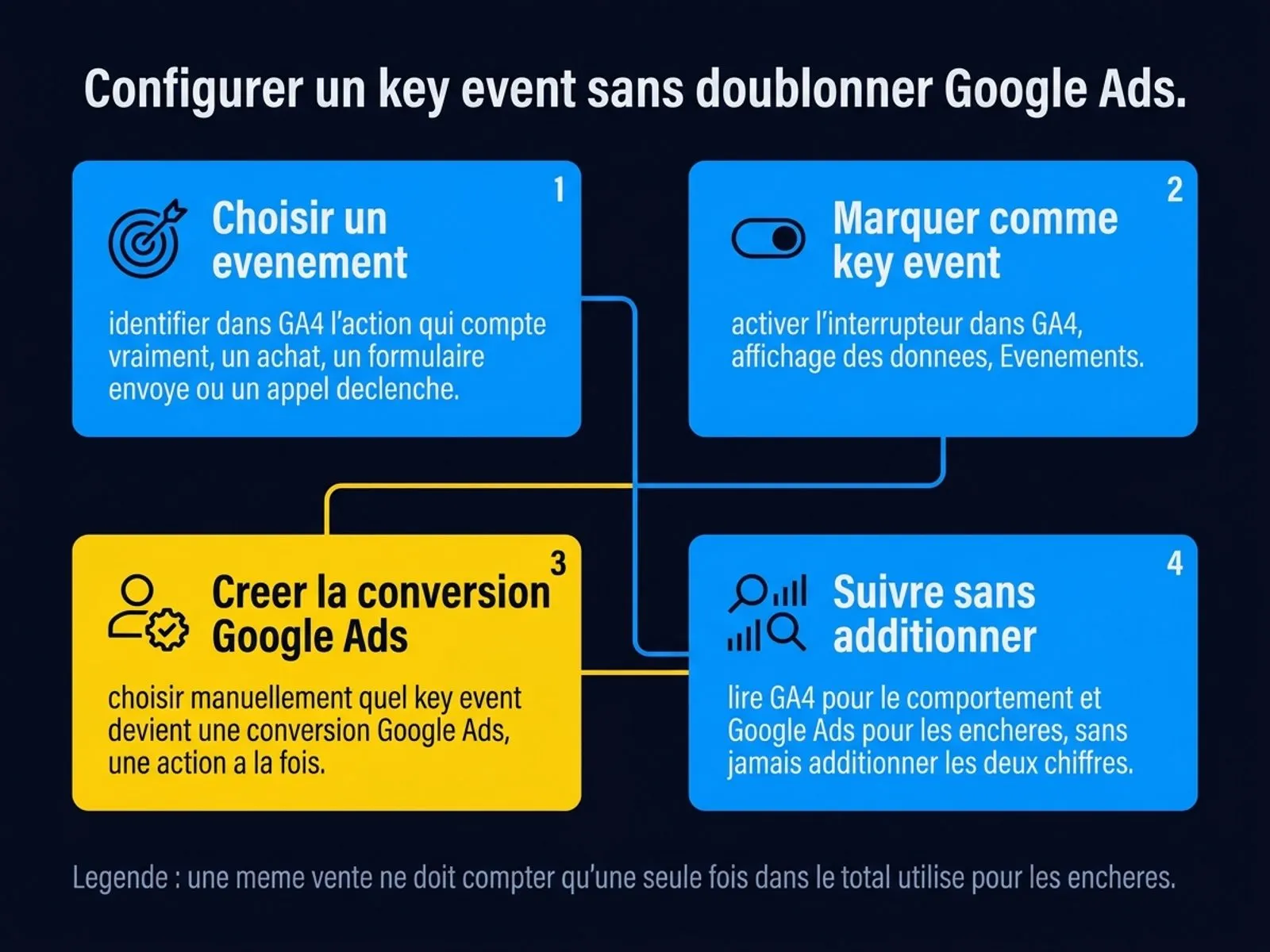
The checks to make, in this order, directly in the GA4 and Google Ads interfaces.
- List your current key events. In GA4, go to Admin, Data display, Events: note which ones are marked as key events.
- List your Google Ads conversion actions. In Google Ads, go to Goals, Conversions: note the source of each one, native tag or GA4 import.
- Compare the two lists. The same business action, such as a purchase, should appear only once in the total used for bidding.
- Choose a single source per action. If the Google Ads tag and the GA4 import track the same purchase, remove one of the two or make it a secondary conversion.
- Document your choice. Write down which source is the reference for each action, so the next person who touches the account doesn’t recreate the duplicate.
- Check the attribution window. A conversion imported from GA4 can follow a different attribution model from the native Google Ads tag, which shifts the date credited to the sale without changing its amount.
Once this list is up to date, maintenance comes down to checking it again whenever a new tool or a new agency touches the account. An account that documents its conversion sources can be reviewed in ten minutes; an account that doesn’t has to be fully re-audited at every doubt.
My take
This renaming doesn’t deserve the attention it’s getting. What deserves attention is that most of the accounts I take over have never gone through the exercise of listing their conversion sources, GA4 and Google Ads alike.
A clean account doesn’t need complicated tools, it needs one clear rule: each business action has one source of truth, and only one. The same logic of a clean signal is at the heart of what I explain about Performance Max: a bidding algorithm doesn’t get smarter with more data, only with accurate data.
Frequently asked questions
Should every key event become a Google Ads conversion?
No. Only send to Google Ads the actions that really weigh on the buying decision, such as a sale or a quote request. A simple click on a button doesn’t need to drive your bids.
Did the old GA4 conversions disappear with the renaming?
No. The events and the data already collected stay the same. Only the name displayed in the GA4 interface changes, along with the screen where you switch on tracking.
How do I know whether a Google Ads conversion comes from a tag or from a GA4 import?
In Google Ads, open the details of each conversion action: the source is shown there, with the name of the original product, Google Ads tag or Google Analytics.
Does GA4 limit the number of key events per property?
Yes, a maximum number is set per property. The exact count and the limit reached are shown in Admin, Data display, Events, directly in your own account.
If I change which event is marked as a key event, do I need to redo my Google Ads setup?
Not automatically. A conversion already imported into Google Ads keeps following its original definition until you change it yourself in the list of conversion actions.
Sources
- Google Analytics Help, About key events, accessed on 26 September 2026.
- Google Analytics Help, Create or modify a key event, accessed on 26 September 2026.
Do you have the right benchmarks?
Question 1 of 4
How does a GA4 event become tracked by Google Ads?

Pierre Bour
Founder of Scale Me. I help businesses with Google Ads, and I build automations and custom tools that take the repetitive tasks off their plate.
Your Google Ads campaigns deserve better than a tutorial.
I run your Google Ads campaigns with a proven method: structure, tracking, bidding, ads. You see the results every week.