Google Merchant Center suspended: how to fix it
Find the cause of a Merchant Center disapproval or suspension, fix your site and feed, then request a review. And understand what a CSS does.

A product disapproval or a Google Merchant Center suspension can stop your shop’s ads from serving. The first step is to identify the reason shown, then fix whatever breaks the policies before you request a review.
A CSS, Feedcast included, cannot guarantee that an account will be unblocked. Creating a new account to get around a suspension is not a way to resolve it. This version, reviewed on 15 September 2026, replaces the earlier advice that presented that approach as a quick fix.
1) Pin down the exact problem
Tell three situations apart: a warning to deal with, a disapproved product and a suspended account. They do not necessarily have the same scope or the same procedure. A campaign that is not spending can also have a Google Ads problem without Merchant Center being suspended.
In Merchant Center, open Products > Needs attention. For an account-level issue, look at the setup or policy issues shown above the table. Note the exact wording, the country, the products affected and the actions requested. Official procedure for finding issues and requesting a review.
Before you change the catalogue, keep a record of the issue and of some affected products. It will help you check that your fix really addresses the cause, and explain to support what has changed.
If you use a Shopify app or a provider to send the feed, identify the source that writes the data. A manual fix in the account can be overwritten at the next upload if the error is still there at the source.
2) Fix the site and the product data
Check how transparent your shop is
For a suspension related to misrepresentation, look at what a buyer can actually verify. The information about the business, the offer and the terms of sale must be accurate and easy to find. Any promises, affiliations or qualifications you display must match reality. Google’s misrepresentation policy.
In practice, go through your shop as a new customer would:
- Can they identify the seller and contact them?
- Do they understand what they are buying, what is included and the conditions stated?
- Can they find the delivery, returns and refund information?
- Does the path to checkout work on mobile?
- Is the information consistent from one page to the next?
This check prepares your diagnosis. It is not a universal list that guarantees approval. The specific reason given on the account remains the starting point.
Compare the feed with the landing pages
Take several affected products and compare the data sent to Google with the shop: ID, title, link, image, price, currency, availability and variants. Also check the attributes required for the category and the country, without inventing a missing product identifier. Official product data specification.
A mismatch can come from the feed, from a variant selected by default, from a promotion or from a stock update. Fix the source, let the new data be processed, then check a sample again.
If your product pages are hard to understand or incomplete, the Shopify SEO guide (in French) helps you review their text and images. That work can make the shop clearer, but it does not replace the Merchant Center procedure.
3) Request a review at the right time
Once your fixes are checked, open the issue and use the option offered. Depending on the case, you can say that you have fixed it or that you disagree with the decision. Provide the information requested and complete identity verification if the account requires it.
Then follow the review status and the account notifications. How long it takes depends on the issue and the procedure; no approval within a week can be promised here. If a waiting period is shown, respect its end date. Google support cannot shorten it. Request a review in Merchant Center.
To put together a clear case, keep the following:
- The account ID and the exact wording of the issue.
- The URLs or IDs of the products affected.
- The fixes made and their dates.
- The concrete facts that explain any appeal.
Do not send a new request until you understand why the previous one was rejected. If the reason is still unclear, use the support offered from the account or ask your provider to go through the case with you.
Do not try to get around the review
Do not artificially remove the problem products only to re-upload them after approval, and do not temporarily change the site to hide the problem. Google describes these attempts in its policy on circumventing account reviews.
In the same way, recreating an account through a tool or a CSS does not make a shop compliant. A legitimate migration must be distinguished from an attempt to escape a sanction. If you are suspended, deal with the cause first, through the official procedure.
4) Understand what a CSS does
A CSS, or Comparison Shopping Service, brings together offers from several merchants. In the countries where the programme runs, including France, merchants go through a CSS to show their Shopping ads. Google Shopping is itself a CSS; you can also choose another provider. How advertising with CSSs works.
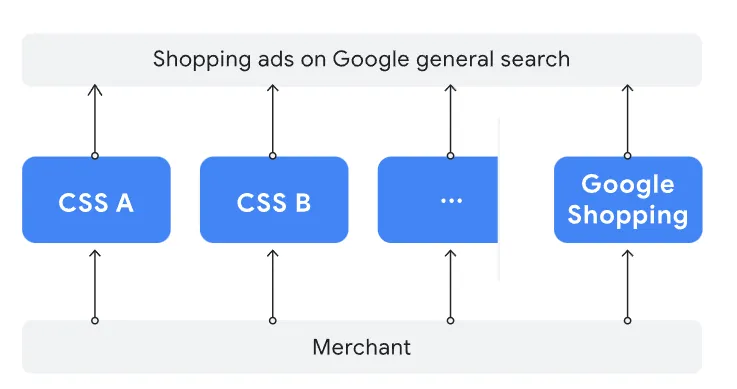
Services vary: feed tool, campaign management, hands-on support or a hybrid model. Some let you keep and transfer an existing account. Ask who administers the accounts, who invoices and what data you can take with you if you change provider. Working with a CSS.
All participants must follow the same Shopping policies. CSS status gives no right to show disapproved products and does not reserve any ad placement for the provider.
5) What Feedcast can bring, and its limits
Feedcast currently offers catalogue management and enrichment, ad distribution and tracking features. Its site lists several plans, including a free starter plan and paid plans. Check the official Feedcast site for the services included and the prices that apply before you choose.
The badge below is kept as a historical illustration of the article. It proves neither your account’s current eligibility nor any ability to get a suspension lifted.
A tool can help spot a feed inconsistency or centralise fixes. A provider can also support the analysis and the exchanges. The approval decision, however, belongs to Google.
The earlier version mentioned twelve shops approved quickly and suggested that a paid plan sped up unblocking. Those points do not allow anyone to promise a comparable result for your account. So the choice of a subscription should not rest on the idea of buying a faster approval.
If you want to look into this solution, here is the Feedcast partner sign-up link. This link may earn Scale Me a commission if the partnership conditions apply. Check the terms Feedcast offers; no subscription is needed to use Google’s review procedure.
6) Resume serving and keep an eye on what follows
After a successful review, check the product status, the authorised countries and destinations, then the linked Google Ads campaigns. A reinstated account does not guarantee that every campaign is ready to serve, nor that it will be profitable.
During the first few days, check for feed errors and for consistency in prices and stock. Keep the rules that prevented the problem: a named owner, a clear data source and a check after any change to the catalogue or the theme.
If you would like the situation looked at as part of managing your campaigns, see my Google Ads media buying service. The analysis is used to decide which fixes are needed; it carries no promise of getting the account unblocked.

FAQ
Can I request a review for free?
The request procedure is available in Merchant Center depending on the status of the account and of the issue. You do not need to subscribe to Feedcast to access it. Outside support, on the other hand, may be paid.
Does changing CSS unblock a suspended account?
No, it is not a guaranteed solution. The site and the products must follow the policies, whatever the CSS. Fix the reason for the suspension and follow Google’s procedure.
Why is the review button greyed out?
Read the message on the account: a prior verification, a review in progress or a waiting period can prevent a new request. The detail shown in your account determines what to do next.
Does a reinstated account get its performance back straight away?
Not necessarily. First check eligibility and serving, then analyse the results with the account data. The length of the interruption, the campaigns and the market may have changed.

Pierre Bour
Founder of Scale Me. I help businesses with Google Ads, and I build automations and custom tools that take the repetitive tasks off their plate.
Your Google Ads campaigns deserve better than a tutorial.
I run your Google Ads campaigns with a proven method: structure, tracking, bidding, ads. You see the results every week.